Context
Configuring Veritas NetBackup to safeguard a Microsoft SharePoint Server farm is an intricately complex operation. It requires establishing dedicated administrative service accounts with specific local security privileges across multiple nodes, applying strict client host properties, and setting up targeted MS-SharePoint policies. To successfully protect both configuration data and back-end SQL databases, infrastructure teams had to manually coordinate configurations across front-end web servers, application servers, and database hosts.
Problem
The legacy configuration workflow was entirely manual, deeply fragmented, and highly error-prone. System administrators had to bounce between Windows Local Security Policies, the NetBackup Administration Console, and separate host properties menus on every individual node in the farm just to map client properties and enable Granular Recovery Technology (GRT). Missing a single step—such as forgetting to assign local security tokens or misconfiguring a background client service account on a single backend host—would cause the entire enterprise backup policy to fail. The platform lacked a centralized, visual wizard to orchestrate these distributed client deployments seamlessly from the master server.
Impact
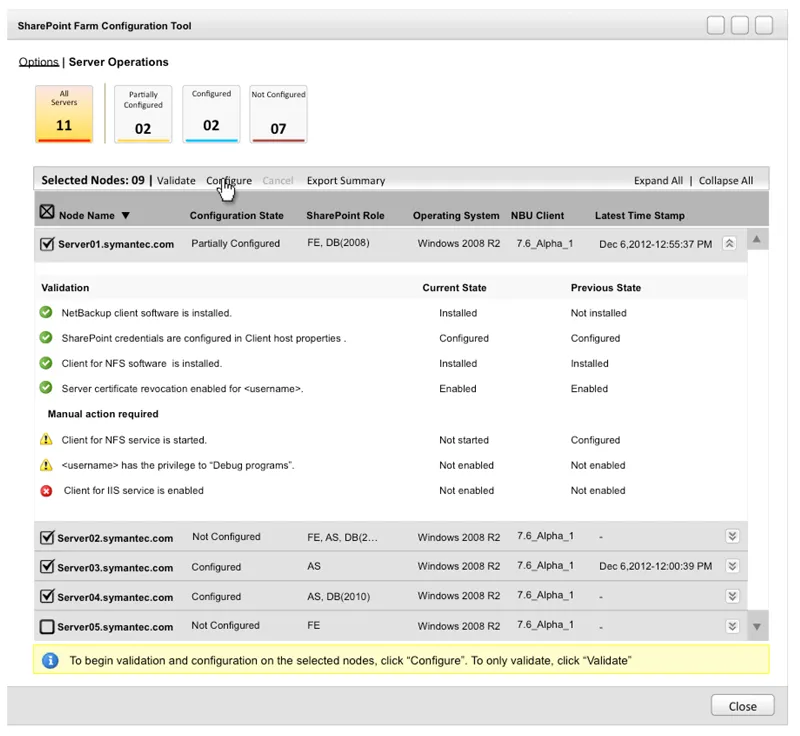
Designed a user interface extension for the NetBackup Master Server configuration console, creating a unified, step-by-step visual workflow that automates and validates SharePoint farm client deployments. By translating abstract, multi-node infrastructure requirements into an intuitive, guided interface, the design allows administrators to discover farm topologies and map properties from a single pane of glass.
By introducing this centralized configuration interface, we:
- Eliminated multi-node configuration silos by providing a single, master-level interface to map farm topologies and GRT options instead of forcing admins to log into individual client hosts.
- Drastically reduced deployment errors by incorporating visual validation checks for required account privileges, local security policies, and service logon accounts before policy execution.
- Streamlined enterprise policy setup by creating a guided wizard that automatically maps the appropriate directives.